

バーチャル3Dクリエイター神部まゆみです(*^_^*)
この記事はUnityの蜘蛛の巣みたいなAnimator画面を見るのが嫌なので、簡単なアニメーション遷移ツールを作った記事です。

Unityのアニメーター画面、蜘蛛の巣みたいで意味不明😣ちょこっとアニメーション遷移だけ作れないのか?
アニメーターの画面、疲れてる時は見る気すら起きないし、Unityの開発側はあれを分かりやすいと思っているのだろうか?(^_^;)
↓ゲームの遷移とかだとこんな感じになり、イミフというほかない…(-_-;)
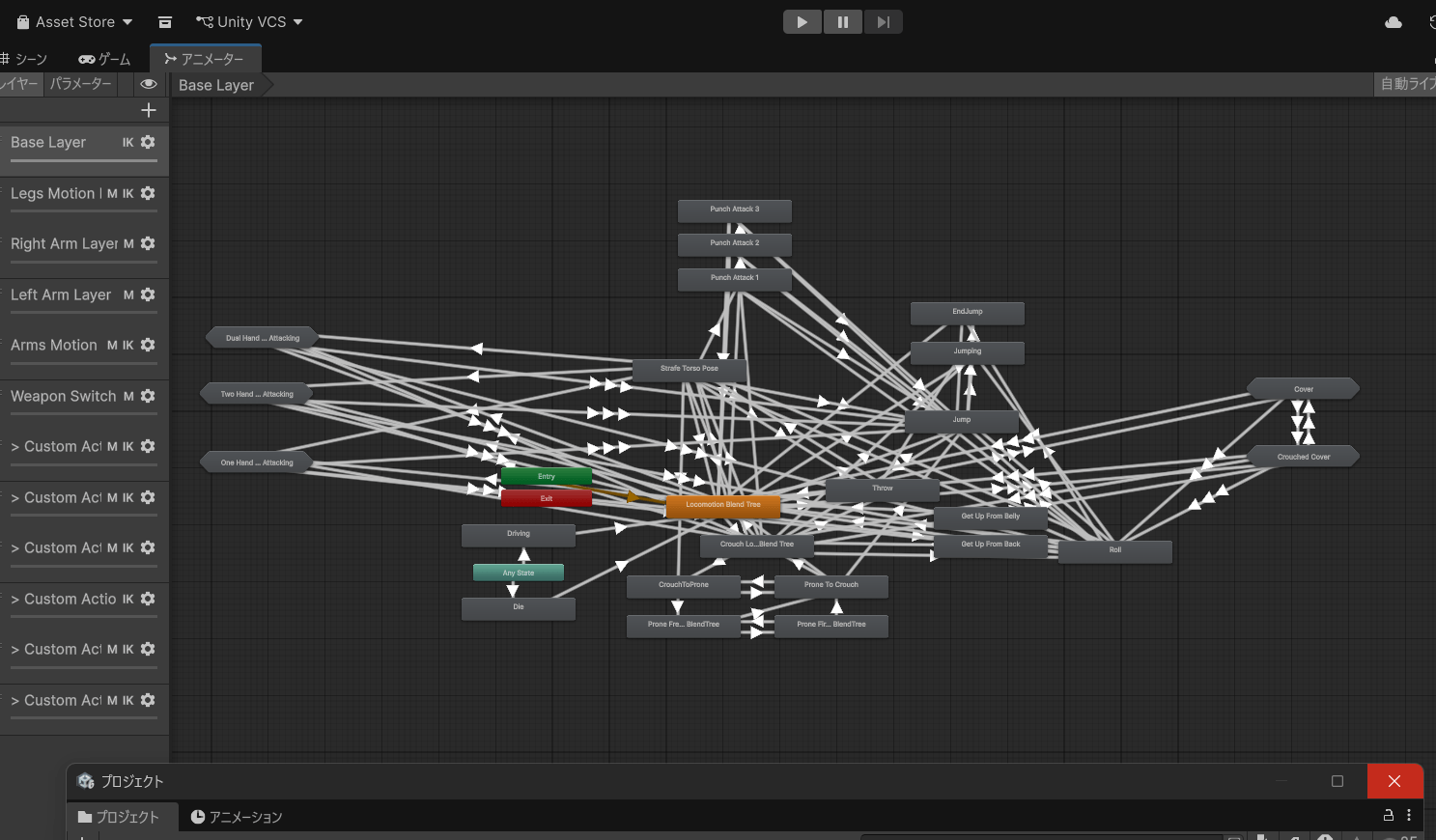
プログラミング界隈のノード信仰というべきか、「ノードなら直感的で分かりやすいでしょ😀」みたいなノリがちょっとイヤかなあ…。
いやいや分かりにくいよっていう(^_^;)あなた本当にこれを分かりやすいと思っているのかと小一時間ほど問い詰めたいくらいには分かりにくいと思うw
まぁじゃあ代案を出せと言われても難しいのだけど、ちょこっと動かしてアニメーションさせたいだけならスクリプトのインスペクター画面からできたので、簡単な動きならこれでいいかと思った。
今はAI時代なので、サクッとAIに手軽なスクリプトを作ってもらえるのが便利ですね。
インスペクターでアニメーションと遷移やループを指定してアニメーターコントローラーを生成する SimpleAnimatorBuilder.cs
結局アニメーターコントローラーは生成するのだけど、インスペクターから遷移やループ回数を指定できる。
とりあえずアニメーションを動かしたい用なので、複雑な遷移条件とかはないです。
using System;
using System.Collections.Generic;
using UnityEngine;

#if UNITY_EDITOR
using UnityEditor;
using UnityEditor.Animations;
#endif

public class SimpleAnimatorBuilder : MonoBehaviour
{
    [Serializable]
    public class AnimationEntry
    {
        [Tooltip("表示用の名前")]
        public string name = "Animation";

        [Tooltip("再生するAnimation Clip")]
        public AnimationClip clip;

        [Tooltip("再生速度")]
        [Min(0.01f)]
        public float speed = 1.0f;

        [Tooltip("再生回数。0 = 無限ループ")]
        [Min(0)]
        public int loopCount = 1;

        [Tooltip("次に再生するAnimation")]
        public int nextAnimationIndex = -1;

        [Tooltip("次のAnimationへ移動するときのクロスフェード時間")]
        [Min(0f)]
        public float fadeDuration = 0.15f;
    }

    [Header("Animator")]
    public Animator animator;

    [Header("Generated Controller")]
    public RuntimeAnimatorController controller;

    [Header("Default Animation")]
    public int defaultAnimationIndex = 0;

    [Header("Animations")]
    public List<AnimationEntry> animations =
        new List<AnimationEntry>();

#if UNITY_EDITOR

    [ContextMenu("Generate Animator Controller")]
    public void GenerateAnimatorController()
    {
        if (animations == null || animations.Count == 0)
        {
            Debug.LogWarning("Animationが登録されていません。");
            return;
        }

        // --------------------------------------------------
        // 保存先
        // --------------------------------------------------

        string folder = "Assets/SimpleAnimatorControllers";

        if (!AssetDatabase.IsValidFolder(folder))
        {
            AssetDatabase.CreateFolder(
                "Assets",
                "SimpleAnimatorControllers"
            );
        }

        string path = EditorUtility.SaveFilePanelInProject(
            "Animator Controllerを保存",
            gameObject.name + "_Controller",
            "controller",
            "Animator Controllerの保存場所を選択してください。",
            folder
        );

        if (string.IsNullOrEmpty(path))
            return;

        // --------------------------------------------------
        // 既存Controller削除
        // --------------------------------------------------

        AnimatorController oldController =
            AssetDatabase.LoadAssetAtPath<AnimatorController>(path);

        if (oldController != null)
        {
            AssetDatabase.DeleteAsset(path);
        }

        // --------------------------------------------------
        // Controller作成
        // --------------------------------------------------

        AnimatorController newController =
            AnimatorController.CreateAnimatorControllerAtPath(path);

        AnimatorStateMachine rootMachine =
            newController.layers[0].stateMachine;

        // --------------------------------------------------
        // 各Animation用のSub-State Machine
        // --------------------------------------------------

        Dictionary<int, AnimatorStateMachine> machineMap =
            new Dictionary<int, AnimatorStateMachine>();

        // --------------------------------------------------
        // Sub-State Machine生成
        // --------------------------------------------------

        for (int i = 0; i < animations.Count; i++)
        {
            AnimationEntry entry = animations[i];

            if (entry == null || entry.clip == null)
                continue;

            string machineName =
                string.IsNullOrEmpty(entry.name)
                    ? entry.clip.name
                    : entry.name;

            AnimatorStateMachine machine =
                rootMachine.AddStateMachine(machineName);

            machineMap.Add(i, machine);

            // --------------------------------------------------
            // 内部State生成
            // --------------------------------------------------

            int count = entry.loopCount <= 0
                ? 1
                : entry.loopCount;

            List<AnimatorState> states =
                new List<AnimatorState>();

            for (int j = 0; j < count; j++)
            {
                string stateName =
                    count == 1
                        ? machineName
                        : machineName + "_" + (j + 1);

                AnimatorState state =
                    machine.AddState(stateName);

                state.motion = entry.clip;
                state.speed = entry.speed;

                states.Add(state);
            }

            // --------------------------------------------------
            // Sub-State MachineのDefault State
            // --------------------------------------------------

            machine.defaultState = states[0];

            // --------------------------------------------------
            // 内部ループ遷移
            // --------------------------------------------------

            for (int j = 0; j < states.Count - 1; j++)
            {
                AnimatorStateTransition transition =
                    states[j].AddTransition(states[j + 1]);

                ConfigureTransition(
                    transition,
                    entry.fadeDuration
                );
            }

            // --------------------------------------------------
            // 最後のState → Exit
            // --------------------------------------------------

            AnimatorState lastState =
                states[states.Count - 1];

            if (entry.loopCount <= 0)
            {
                // 無限ループの場合は
                // Sub-State Machineから出ない
                //
                // AnimationClip側がLoop Timeなら
                // そのまま無限再生される
            }
            else
            {
                AnimatorStateTransition exitTransition =
                    lastState.AddExitTransition();

                ConfigureTransition(
                    exitTransition,
                    entry.fadeDuration
                );
            }
        }

        // --------------------------------------------------
        // RootのDefault
        // --------------------------------------------------

        if (machineMap.ContainsKey(defaultAnimationIndex))
        {
            // Entry → Default Sub-State Machine
            AnimatorTransition entryTransition =
                rootMachine.AddEntryTransition(
                    machineMap[defaultAnimationIndex]
                );

            entryTransition.conditions =
                Array.Empty<AnimatorCondition>();
        }
        else
        {
            // 念のため最初のSub-State MachineをDefaultにする
            foreach (AnimatorStateMachine machine
                     in machineMap.Values)
            {
                AnimatorTransition entryTransition =
                    rootMachine.AddEntryTransition(machine);

                entryTransition.conditions =
                    Array.Empty<AnimatorCondition>();

                break;
            }
        }

        // --------------------------------------------------
        // Sub-State Machine同士の遷移
        // --------------------------------------------------

        foreach (KeyValuePair<int, AnimatorStateMachine> pair
                 in machineMap)
        {
            int index = pair.Key;

            AnimatorStateMachine currentMachine =
                pair.Value;

            AnimationEntry entry =
                animations[index];

            int nextIndex =
                entry.nextAnimationIndex;

            if (nextIndex < 0 ||
                !machineMap.ContainsKey(nextIndex))
            {
                continue;
            }

            AnimatorStateMachine nextMachine =
                machineMap[nextIndex];

            AnimatorTransition transition =
                rootMachine.AddStateMachineTransition(
                    currentMachine,
                    nextMachine
                );

            transition.conditions =
                Array.Empty<AnimatorCondition>();
        }

        // --------------------------------------------------
        // 保存
        // --------------------------------------------------

        AssetDatabase.SaveAssets();
        AssetDatabase.Refresh();

        controller =
            AssetDatabase.LoadAssetAtPath<
                RuntimeAnimatorController
            >(path);

        // Animatorへ設定
        if (animator != null)
        {
            animator.runtimeAnimatorController =
                controller;

            EditorUtility.SetDirty(animator);
        }

        EditorUtility.SetDirty(this);

        Debug.Log(
            "Sub-State Machine方式のAnimator Controllerを生成しました。\n" +
            path
        );
    }

    // --------------------------------------------------
    // State Transition設定
    // --------------------------------------------------

    private void ConfigureTransition(
        AnimatorStateTransition transition,
        float fadeDuration)
    {
        transition.hasExitTime = true;

        transition.exitTime = 1.0f;

        transition.duration = fadeDuration;

        transition.hasFixedDuration = true;

        transition.offset = 0f;

        transition.conditions =
            Array.Empty<AnimatorCondition>();
    }

#endif
}
エディター拡張 SimpleAnimatorBuilderEditor.cs
エディター拡張機能も使うのでこれも作ります。
アセットフォルダ下にEditorフォルダをなければ作って、そこに入れます。
using UnityEditor;
using UnityEngine;

[CustomEditor(typeof(SimpleAnimatorBuilder))]
public class SimpleAnimatorBuilderEditor : Editor
{
    public override void OnInspectorGUI()
    {
        SimpleAnimatorBuilder builder =
            (SimpleAnimatorBuilder)target;

        serializedObject.Update();

        // Animator
        EditorGUILayout.PropertyField(
            serializedObject.FindProperty("animator")
        );

        // Controller
        EditorGUILayout.PropertyField(
            serializedObject.FindProperty("controller")
        );

        EditorGUILayout.Space();

        // --------------------------------------------------
        // Default Animation
        // --------------------------------------------------

        DrawAnimationPopup(
            "Default Animation",
            builder,
            ref builder.defaultAnimationIndex
        );

        EditorGUILayout.Space();

        // --------------------------------------------------
        // Animation List
        // --------------------------------------------------

        SerializedProperty animationsProperty =
            serializedObject.FindProperty("animations");

        EditorGUILayout.PropertyField(
            animationsProperty,
            new GUIContent("Animations"),
            false
        );

        if (animationsProperty.isExpanded)
        {
            EditorGUI.indentLevel++;

            for (int i = 0;
                 i < animationsProperty.arraySize;
                 i++)
            {
                SerializedProperty element =
                    animationsProperty.GetArrayElementAtIndex(i);

                EditorGUILayout.BeginVertical(
                    "box"
                );

                string title =
                    "Animation " + i;

                if (i < builder.animations.Count &&
                    builder.animations[i] != null)
                {
                    title =
                        string.IsNullOrEmpty(
                            builder.animations[i].name
                        )
                        ? "Animation " + i
                        : builder.animations[i].name;
                }

                element.isExpanded =
                    EditorGUILayout.Foldout(
                        element.isExpanded,
                        title,
                        true
                    );

                if (element.isExpanded)
                {
                    EditorGUI.indentLevel++;

                    EditorGUILayout.PropertyField(
                        element.FindPropertyRelative("name")
                    );

                    EditorGUILayout.PropertyField(
                        element.FindPropertyRelative("clip")
                    );

                    EditorGUILayout.PropertyField(
                        element.FindPropertyRelative("speed")
                    );

                    EditorGUILayout.PropertyField(
                        element.FindPropertyRelative("loopCount")
                    );

                    // Next Animation
                    if (i < builder.animations.Count)
                    {
                        DrawNextPopup(
                            builder,
                            i
                        );
                    }

                    EditorGUILayout.PropertyField(
                        element.FindPropertyRelative(
                            "fadeDuration"
                        ),
                        new GUIContent("Fade Duration")
                    );

                    EditorGUI.indentLevel--;
                }

                EditorGUILayout.EndVertical();
            }

            EditorGUI.indentLevel--;
        }

        EditorGUILayout.Space(10);

        // --------------------------------------------------
        // Generate Button
        // --------------------------------------------------

        if (GUILayout.Button(
            "Generate Animator Controller",
            GUILayout.Height(35)))
        {
            serializedObject.ApplyModifiedProperties();

            builder.GenerateAnimatorController();

            EditorUtility.SetDirty(builder);

            AssetDatabase.SaveAssets();
        }

        serializedObject.ApplyModifiedProperties();
    }

    // --------------------------------------------------
    // Default Animation Popup
    // --------------------------------------------------

    private void DrawAnimationPopup(
        string label,
        SimpleAnimatorBuilder builder,
        ref int index)
    {
        string[] names =
            GetAnimationNames(builder);

        if (names.Length == 0)
            return;

        index = Mathf.Clamp(
            index,
            0,
            names.Length - 1
        );

        index =
            EditorGUILayout.Popup(
                label,
                index,
                names
            );
    }

    // --------------------------------------------------
    // Next Animation Popup
    // --------------------------------------------------

    private void DrawNextPopup(
        SimpleAnimatorBuilder builder,
        int currentIndex)
    {
        if (builder.animations == null ||
            builder.animations.Count == 0)
            return;

        AnimationEntryDummy(builder, currentIndex);
    }

    private void AnimationEntryDummy(
        SimpleAnimatorBuilder builder,
        int currentIndex)
    {
        SimpleAnimatorBuilder.AnimationEntry entry =
            builder.animations[currentIndex];

        ListWrapper(builder, entry, currentIndex);
    }

    private void ListWrapper(
        SimpleAnimatorBuilder builder,
        SimpleAnimatorBuilder.AnimationEntry entry,
        int currentIndex)
    {
        List<string> names =
            new List<string>();

        names.Add("None");

        for (int i = 0;
             i < builder.animations.Count;
             i++)
        {
            string name =
                builder.animations[i] != null &&
                !string.IsNullOrEmpty(
                    builder.animations[i].name
                )
                ? builder.animations[i].name
                : "Animation " + i;

            names.Add(
                i + " : " + name
            );
        }

        int popupIndex =
            entry.nextAnimationIndex + 1;

        popupIndex = Mathf.Clamp(
            popupIndex,
            0,
            names.Count - 1
        );

        int newPopupIndex =
            EditorGUILayout.Popup(
                "Next Animation",
                popupIndex,
                names.ToArray()
            );

        entry.nextAnimationIndex =
            newPopupIndex - 1;

        EditorUtility.SetDirty(builder);
    }

    // --------------------------------------------------
    // Animation Names
    // --------------------------------------------------

    private string[] GetAnimationNames(
        SimpleAnimatorBuilder builder)
    {
        List<string> names =
            new List<string>();

        for (int i = 0;
             i < builder.animations.Count;
             i++)
        {
            string name =
                builder.animations[i] != null &&
                !string.IsNullOrEmpty(
                    builder.animations[i].name
                )
                ? builder.animations[i].name
                : "Animation " + i;

            names.Add(
                i + " : " + name
            );
        }

        return names.ToArray();
    }
}
使い方 適当なオブジェクトにアタッチ、アニメーションを指定してループ回数や遷移などを指定、Generator Animator Controllerボタンを押す
Animatorにはモデルに付けたアニメーターコンポーネントを指定。ヒエラルキーからモデルをD&DでもOK。
Generated Controllerは新規に作成して適当に指定する。
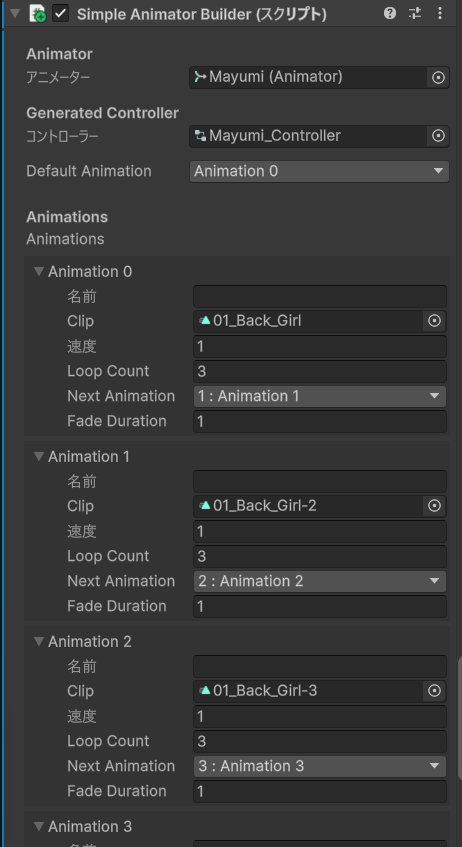
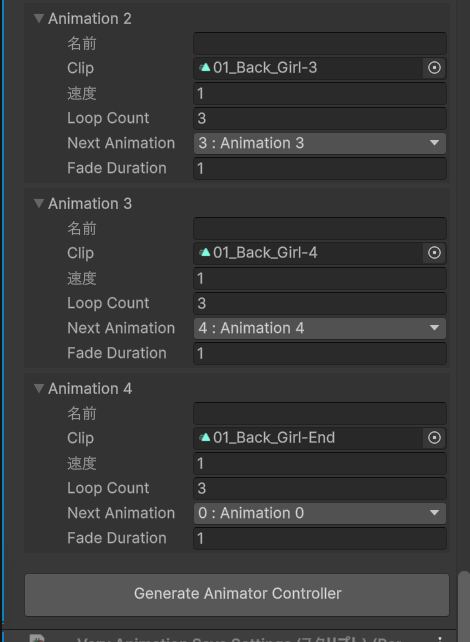
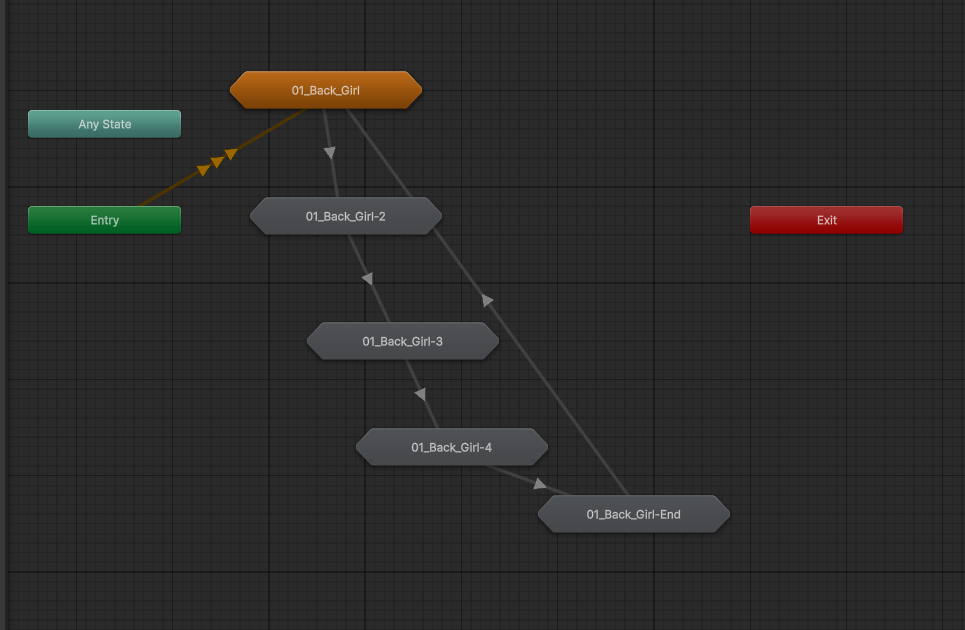
これでこんな感じにアニメーターコントローラーが生成されます。
おわりに
案外簡単にできて良かった。
まぁ私はちょこっと動かしてPixivのうごイラに投稿したいとかそういう用途が多いからこれでもいいけど、本格的にゲームを作る場合は蜘蛛の巣と戦わないといけませんね(-_-;)
最近はAIにやってもらえるようにもなってきているから、以前よりはだいぶマシになってきているとは思うけども。
とりあえずシンプルに動かすだけならこれでいけたので、同じような用途の人は参考にしてください。
また何かあれば追記します(*^_^*)